Oomnitza May 2025 Release: SaaS Visibility, AI Audit Docs, and New DCAM Module
Table of Contents
KEY TAKEAWAYS
- A unified, customizable SaaS user view replaces manual dashboards, with filters, custom fields, and automation triggers built in.
- License tracking no longer requires a hard cap — Oomnitza now supports capped, soft-threshold, and uncapped contracts with accurate reporting for all three.
- Doc Agent uses AI to automatically generate real-time, audit-ready documentation of system configuration, workflows, and integrations.
- User activity logs can now capture IP addresses (opt-in, off by default) to support GDPR compliance and stronger access monitoring.
- Sync Session Details and a new Integration Version Log give admins plain-English error messages and full pre-upgrade visibility.
- Field mappings now persist through integration upgrades, and Oomnitza has expanded support to 1,500+ connectors, including Workday, Shopify, Greenhouse, and Zoom devices.
- A new Data Center Asset Management (DCAM) module extends asset lifecycle visibility into racks, colocation, and hybrid data center environments.
Oomnitza’s May 2025 release adds a unified SaaS user view, flexible license tracking (no hard cap required), AI-generated audit documentation via Doc Agent, expanded support for 1,500+ integrations, and a new Data Center Asset Management (DCAM) module — extending Oomnitza’s trusted asset intelligence layer from endpoints and SaaS into the data center.
April showers bring May…features? You better believe it. Our latest release is packed with updates to help you move faster, work smarter, and stay audit-ready without breaking a sweat.
From sharper SaaS insights to smoother integrations and smarter automation, this release is all about giving you the visibility and velocity you need to manage IT like a pro—even when your to-do list is longer than your asset list.
Every feature in this release is designed with one goal in mind: to help you spend less time fighting with spreadsheets and more time building a secure, efficient, and future-proof IT operation.
Let’s dig into what’s new—and how it can make your day-to-day just a little (or a lot) easier.
Streamlining SaaS and Software Management
We’re making SaaS and desktop software management more flexible and efficient—so you can ditch the manual work and focus on what matters.
Get a Unified View of Your SaaS Users
You asked, we delivered: a customizable, consolidated SaaS user view.
With advanced filters, custom fields, and automation triggers, you can now:
- Build dashboards that surface real SaaS usage insights
- Run meaningful reports to support smarter decisions
- Automate processes based on the data that matters most
No more duct-taping workarounds just to manage user data. This new view puts clarity and control back in your hands.
Track Licenses Without the Limits
Oomnitza now tracks SaaS license usage whether your contract has a hard cap, a soft threshold, or no limit at all.
Previously, you had to set a license cap just to track usage. That’s no longer the case. With flexible license tracking, you can monitor license allocation whether your contract includes a hard cap, soft threshold, or no restriction at all. That means:
- Cleaner, more accurate reporting
- Easier forecasting and renewal planning
- Better procurement alignment
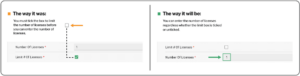
The Way It Was | The Way It Will Be | |
License Cap | Required a box to be ticked to set a number | Optional to enter a number with or without a cap |
Reporting | Inaccurate for uncapped or soft-limit contracts | Accurate regardless of contract type |
License management just got a lot less rigid—and a lot more useful.
Remove Desktop Users in One Click
Offboarding shouldn’t take a dozen clicks. Now, you can remove one or multiple users directly from the Desktop Software module—no more jumping through hoops to clean up license records.
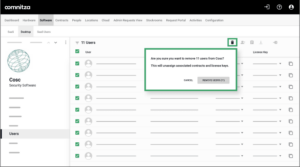 Whether you’re retiring software or cleaning up after a contract change, this update makes user management faster, easier, and more reliable.
Faster SaaS User Integrations
Adding SaaS integrations used to mean building a workflow for every single one. Now, you can automatically pull in user roles and activity data—with no extra setup.
We’ve added new support for:
- Role and login attributes for SaaS users
- Deactivation of stale user records
- Seamless mapping and testing in custom integrations
Rollout will happen in phases, and we’ll let you know when your integrations are ready to upgrade.
Enhancing Audit Readiness and Change Control
Security, compliance, and change tracking continue to be top-of-mind for IT teams—and this release brings powerful updates to help you stay one step ahead.
Generate Audit-Ready Documentation with Doc Agent
Manual documentation? No thanks. Our new Doc Agent uses AI to automatically scan and summarize your Oomnitza system configuration—including tables, workflows, integrations, and other system objects.
Doc Agent delivers:
- Consistent, real-time documentation that’s always audit-ready
- Time savings for your IT and compliance teams
- Fewer errors and greater confidence in your change control processes
Audit-ready documentation is only useful if it’s trustworthy. Doc Agent keeps it current automatically, so it reflects what’s actually true in your environment, not what was true last quarter
Doc Agent gives you comprehensive system visibility without the manual effort—so you’re always prepared when audit season rolls around.
Track IP Addresses for Greater Visibility and Compliance
With user activity logs now showing IP addresses, you can:
- Monitor system access with more precision
- Strengthen security and detect potential threats
- Meet data retention and GDPR compliance standards
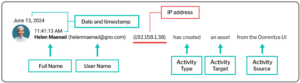 You’re in control. IP tracking is turned off by default, so you can choose exactly when and where it’s needed.
Add Ticketing Context to Migration Logs
We’ve added two simple fields—Ticket Number and Notes—to the migration log, and they make a big difference.
You can now:
- Capture the why behind every migration
- Link system changes to help desk tickets or internal change records
- Simplify auditing and reduce the time it takes to troubleshoot
The result? More traceability, less confusion, and better alignment between change management and IT operations.
Improving Integration Visibility and Reliability
Integrations are the lifeblood of your IT ecosystem—and when something breaks, you need answers fast. That’s why this release focuses on better transparency, smarter upgrade workflows, and reduced manual effort.
Understand Sync Failures at a Glance
Ever run a sync and been left scratching your head about what went wrong? With our upgraded Sync
Session Details, you now get:
- Clear error messages in plain English
- Record-level logs you can export or copy for troubleshooting
- Filters that help you zero in on issues faster
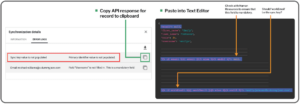 No more guesswork or waiting for support. You get the info you need to fix sync issues on your own—quickly and confidently.
Every connector you add feeds the same trusted asset record, not a separate silo.
Make Smarter Decisions with the Integration Version Log
Now, before you hit that “Upgrade” button, you can review a full Integration Version Log to see:
- What changed
- What was fixed
- Which fields were added or deprecated
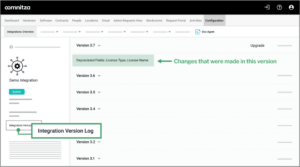 No more flying blind. You’ll be able to plan ahead, minimize disruptions, and ensure every upgrade goes smoothly.
Preserve Field Mappings When Upgrading
One of the most frustrating parts of an integration upgrade? Losing your configurations and having to rebuild them. Not anymore.
We now retain your field mappings—even dynamic fields—during integration upgrades. Any fields that are no longer available will be flagged clearly, so you can review and remove them without a hitch.
Turnkey Connector Updates for Easier Expansion
We’ve added and enhanced support for over 1,500 connectors—including:
- New authentication options: Okta (OAuth 2.0), ManageEngine, and UKG with session-based auth
- Upgraded APIs: Absolute, Workspace ONE
- New integrations: Shopify, Greenhouse, Workday, Verizon, Zoom devices, Nexthink, TeamDynamix
- New API presets: UPS Shipping & Tracking, Nexthink Remote Actions
These updates help you integrate with more tools, more easily—and keep your data flowing smoothly.
Upgrading Core Platform Capabilities
Beyond integrations and workflows, this release brings quality-of-life improvements to the platform itself—helping you work faster, clean up data more easily, and control access more effectively.
Know Exactly What Happened in Every Import
Importing data should never feel like a leap of faith. Now, whether your import succeeds or partially fails, Oomnitza will generate a comprehensive import log showing:
- What was created, updated, skipped, or failed
- Why certain records didn’t go through
- How to fix them
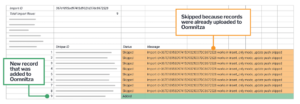 It’s one more way we’re helping you ensure clean, accurate, and complete data across your environment.
Make Custom Objects as Powerful as System Objects
We’ve taken big steps to close the functionality gap between system and custom objects. With this release, custom objects now support:
- Subscription Reports: Schedule and email filtered reports to teammates or external recipients
- Filtered Dropdowns: Create dependent fields (e.g., office > state) for smarter data entry
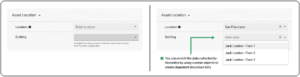
- Data Access Controls: Fine-tune who can see or edit dropdown values, enhancing security and consistency
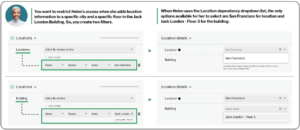 It’s all about giving you the same power and flexibility—whether you’re using out-of-the-box fields or building your own.
Submit Portal Requests in One Streamlined Flow
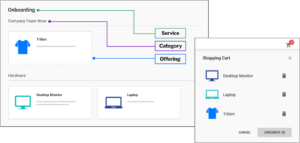
Requesting multiple items through the portal used to mean creating one ticket at a time. Now, you can bundle multiple requests together using a shopping cart-style experience that’s faster, cleaner, and more efficient.
 New DCAM Solution
The data center isn’t dead—it’s evolving at a very rapid rate. And our brand-new Data Center Asset Management (DCAM) offering is built to help you keep up with the speed, scale, and complexity of modern hybrid IT.
Whether you’re managing racks in a colocation site, core infrastructure in your own data center, or a sprawl of AI workloads across environments—Oomnitza DCAM gives you:
- Complete lifecycle visibility: From forecasting and deployment to decommissioning and disposal
- Contingency and break-fix planning: Keep operations running smoothly with automated response workflows
- Warranty and refresh automation: Never miss a hardware replacement or vendor deadline again
- Secure disposal and audit trails: Manage decommissioning with confidence, including chain-of-custody tracking
- Normalized data from all sources: Reconcile information across systems for consistent, trustworthy insights
DCAM extends Oomnitza’s trusted asset intelligence layer beyond the endpoint and into the data center.
It’s everything you need to modernize your infrastructure management, without adding more tools, teams, or headaches.
Frequently Asked Questions about Oomnitza’s May 2025 Product Release
1. What’s new in Oomnitza’s May 2025 release?
The release adds a unified SaaS user view, flexible license tracking, AI-generated audit documentation (Doc Agent), expanded integration visibility across 1,500+ connectors, and a new Data Center Asset Management (DCAM) module.
2. Can Oomnitza track SaaS licenses without a hard cap?
Yes. As of the May 2025 release, Oomnitza supports license tracking for hard caps, soft thresholds, or no limit at all, so reporting stays accurate regardless of how a contract is structured.
3. How many integrations does Oomnitza support?
Oomnitza supports more than 1,500 connectors and continues to expand, with newly added integrations for Workday, ServiceNow, Jamf, Shopify, Greenhouse, Verizon, Zoom devices, Nexthink, and TeamDynamix.
4. Does Oomnitza track IP addresses for compliance?
Yes, on an opt-in basis. Administrators can enable IP address tracking in user activity logs to support GDPR compliance and strengthen visibility into system access; it’s off by default so teams control when it’s used.
This Release is Just the Beginning
The May 2025 release reflects our commitment to helping you manage complexity with clarity—and scale your IT operations without sacrificing control.
We hope you love what’s new. And if you’re not yet an Oomnitza customer, maybe this is the release that turns curiosity into action.
Because when you can see everything, automate anything, and trust your data—you’re not just ready for what’s next, you’re ready for AI-driven IT operations based on trusted asset data .